Java Virtual Machine(JVM)
What is the meaning of Virtual?
Virtual means Not Reality. it doesn’t physically exist.
For example
A virtual classroom is a video conferencing tool that allows teachers and students to interact with one another and the learning content. Virtual classrooms differ from traditional video conferencing solutions in that they include additional capabilities that are necessary in a learning environment.
What is the meaning of Machine?
Machine means help for your work. then different machines help with different things.
Example -Car is a machine.
Then what is the meaning of Virtual Machine?
There is a machine but it's not real. it’s virtual.
There are two types of Virtual Machine
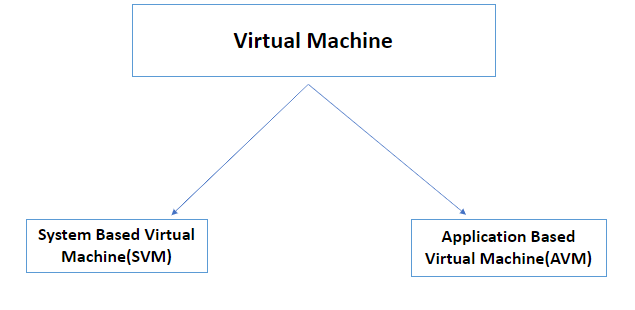
System-Based Virtual Machine(SVM)
- A single physical machine that allows users to work in multiple virtual environments or instances. These environments are entirely independent of one another.
Example -Xen , Hyperviser
Application-Based Virtual Machine(AVM)
- Application Based Virtual Machine does not involve any hardware device, but it needs some software or applications to create a virtual machine. we can also be called process Based Virtual Machine
Example- Java Virtual Machine(JVM) , Common Language Runtime(CLR),Parrot Virtual Machine (PVM)
Let’s try to understand what is the meaning of Java Virtual Machine?
Java Virtual Machine is Completely Specification. it says how should be done. Java Virtual Machine (JVM) is platform-independent Because every platform such as Windows, Mac OS and Linux has its own JVM. when you download Java Runtime Environment(JRE), Java Virtual Machine(JVM) comes to the JRE that will deploy all the necessary code to create a Java Virtual Machine(JVM). JRE is tightly platform-dependent.
When you are executing a java program then it will create a JVM instance in the computer. When your program will exit then the JVM instance also will die. then JVM instances exist in a computer until a program runs.
If you are not executing any program on your computer at that particular time frame, we don’t have a JVM instance on the Computer, only JDK and JRE are there.
Let’s see how to JVM instance to create
Now think you want to compile Hello world application. then you type javac HelloWorld.java. then it will create a java class file. when we want to execute the program you type terminal java HelloWorld and press enter, At the moment that type java keyword in the execution the JVM instance will create. the java instance is called from the Operating System by the java filename command.
When a JVM instance is called, it creates a non-daemon thread. I will discuss daemon-thread and non-daemon thread in this article. just keep in mind that. then your class java main method ‘public static void main’ is executed. keep in mind, that your class must have the main method and it should be ‘public’ and ‘void’.
The JVM start a non-demon thread also create. This demon thread is capable to create other non-demon threads.
There are two ways to destroy the JVM instance.
1. There’s no non-daemon thread that exists which means all the non-daemon threads are destroyed.
2. An application can do suicide, which means it can call the System exit method.
This is the life cycle for Java Virtual Machine.
Look at the JDK JRE And JVM Architecture

Let’s see what are the component inside the Java Virtual Machine(JVM)
There are three components in Java Virtual Machine.
- Class Loader
- Memory Area
- Execution Engine
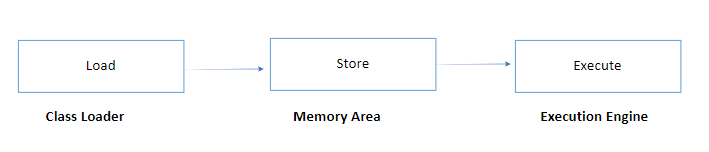
JVM Architecture

Let’s see How Memory Area works
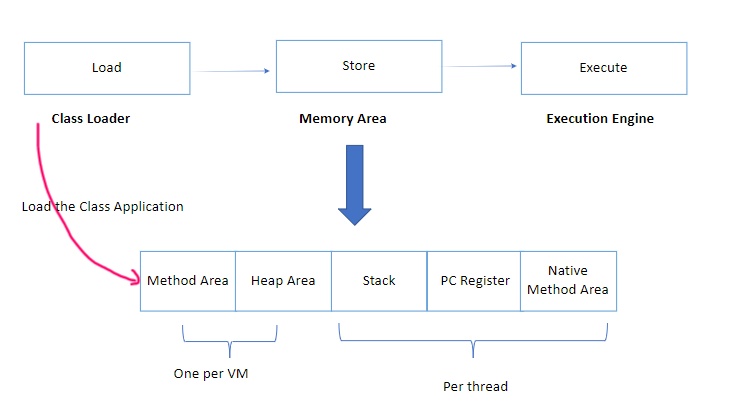
Method Area
When you load the class it will load all the class information into this method area.
Heap Area
when you load this class all objects will come to the Heap Area
Each and JVM have only method area and one Heap Area
Stack
The stack keeps the method information such as example-Local variable
PC Registry
The PC register will hold the information about the next execution. PC register will not hold the information about the non-native method.
Native Methods
A native method gives facilities to hold the native methods and other stuff.
Stack and PC register will hold the information per thread.
Let’s See about Class Loader
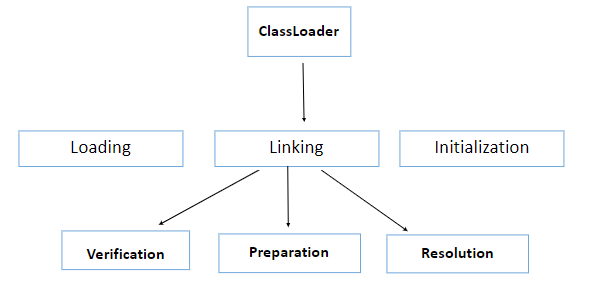
ClassLoader is the main responsibility of taking the class and load into the Memory Area.
ClassLoader has 3 phases
- Loading
- Linking
- Initialization.
✔ Loading
Loading is mainly responsible for that take class files and putting in into the memory. when did do that it’s doing several things,
- Fully qualified class name
-It reads about whether this is a class, an interface or an enum.
It reads about immediate parent information.
it reads about variable information.
Then it loads the class file to the memory area. JVM does a special thing, JVM creates an object from the class type.
✔ Linking
Linking is divided into three Steps
- Verification
- Preparation
- Resolution
Verification
What is the Verification means?
Java has a bytecode verifier in JVM. Where if there exactly check class file safety execute or not. Then JVM makes sure to execute safety execute. When you try to load the class, the bytecode verifier exactly checks whether the class is safe to execute or not. It means the bytecode verifier verifies, whether it is come from a valid compiler, whether it has a correct structure and whether this class file has correct formatting. If any of these areas are not satisfied and JVM throws a Runtime Exception called Verifier Exception. Everything is done then the verification process is completed. after then its moves to the preparation process.
Preparation
What is the meaning of Preparation?
If you use any instance variables or static variables in your class, this preparation part will assign a default value for that. Keep in mind These are the default value Not initialised values.
Think your class has a static int variable called age assign the value of 12. So in preparation, this will assign as 0 because the default value of int is 0.
Resolution
Resolution: In this phase, it will replace the symbolic link with the direct link.
Think, We have “Employee”, “Student”, “Customer” etc like objects. But the machine level does not understand those. It will consider all those objects as Business objects. They can called also Domain-specific objects. As JVM doesn’t understand who this Employee, Student, Customer etc, Then this JVM does before it reaches the machine level, JVM replaces those symbolic links with the direct link.
Example 2: Employee employee= new Employee();
So In the resolution part, it replaces this everywhere which you used Employee with the specific memory location reserved by this newly created Employee object.
✔ Initialization
Initialization assigns real value.
There is a rule, every class must be initialized before its Active Use.
What is the active use of the class?
1️. new keyword
Employee employee= new Employee();
2️. invoke static method- verify() is a static method
Employee.verify();
3️. assign values to the static field- that means to assign the static Field in Employee Class
Employee.code = 5;
4️. if the class is an initial class that has the main method.
5️. if using a reflection API to load the class-getInstance
6️. instance subclass
All these 6 cases are considered an active class in Java
If any of the above applies to the class, it should go through the initialization process. It is not required to go through the initialization process if it is not.
How to initialize a class?
- Use new keyword
2. Use clone() method
3. Use reflection API (get instance)
4. Use Io.objectinputstream class
How does Java go through with constructors and instantiate parent class?
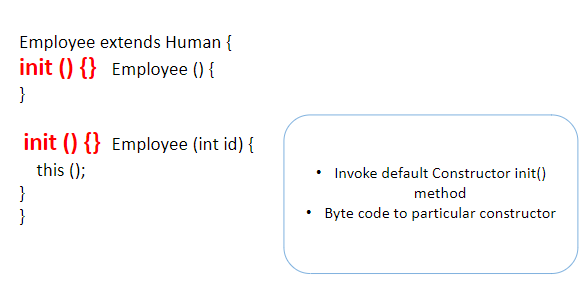
without this keyword
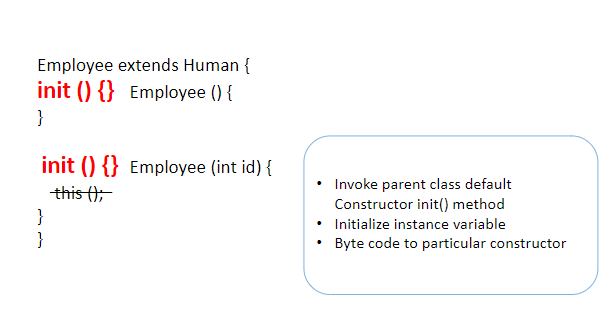
“init()” contains code to call the default constructor to the init method, as well as code to initialize instance variables and bytecode for the specific implementation.
If this() was not specified in the Constructor, “init()” would contain code to invoke the parent class’s default constructor init method, as well as code to initialize instance variables finally, the bytecode for the specific implementation.
So, There are 3 kinds of codes in the init methods
- Invoke some other Constructor init() method
- Initialize instance variable
- Byte code for a particular constructor
Java Data Types in JVM
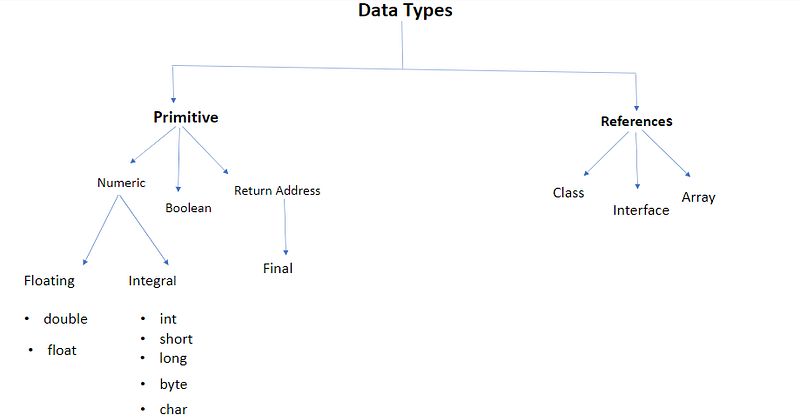
There are 2 data types in JVM
- Primitive Types
- References Types
Primitive Types
It holds the values of data. There are 3 types in primitive types
- Numeric
- Boolean
- Return Address
Numeric is divided into two types. There are Floating and Integral Types.
Again Floating is divided into Float and Double.
Integral is divided into five
- byte
- short
- int
- long
- char
Return Address: this is a specific type to implement final.
Reference Types
It holds references to objects. There are 3 types in reference
- Class type reference
- Object type reference
- Array type reference.
- Class type reference: Reference to an instance of the class.
- Object type reference: Reference to class implementation.
- Array type reference: Reference to Array.
Look at chart
What is Word Size?
Word Size is a just Base needed for assigned value. The length of a word size is decided by a particular implementation.
There are two rules about the word size
- A word should be able to hold any primitive data type
- Two words should be able to carry long or double value
According to Word size at least should be the length of 32bits.
I hope, in this article, you can get knowledge about Java Virtual Machine(JVM). I will cover Java in upcoming articles. Stay on with me.
Comments
Post a Comment