How Object Behave?

Hello everyone, In This article, you will learn about how the state and how to relate to one another. We know about objects and variables. I give you a small reminder class that describes what an object knows and what an object does.
A class is not an object. The object is used to create a class. It tells the JVM how to make an object of that particular type. Each object made from that class can have a value for the instance variable.
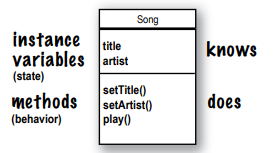
if you want to remind read my article first. links are here -A Trip to Objects and Classes, Know your Variables. It will help you.
you already know that every object of that type can have a different instance variable. what about the method?
Can objects of that type have different method behaviour?
Every instance of a class has the same methods, but depending on the value of the instance variables, the methods can behave differently.
Look at this example.
Dog t1 = new Dog();
t1.mydog();
Dog t2 = new Dog();
t2.dogname("Tommy");
Dog t3 = new Dog();
t3.dogage();
Arguments and Parameters
The things you pass into the methods are called arguments. A parameter is nothing more than a local variable, and an argument is a value like 6, “Timmy,” or a reference to a Dog. A variable with a name and a type that can be used within the method body.

But here’s the important: If a method requires a parameter, you must provide it with something. And it has to be the right kind of value.
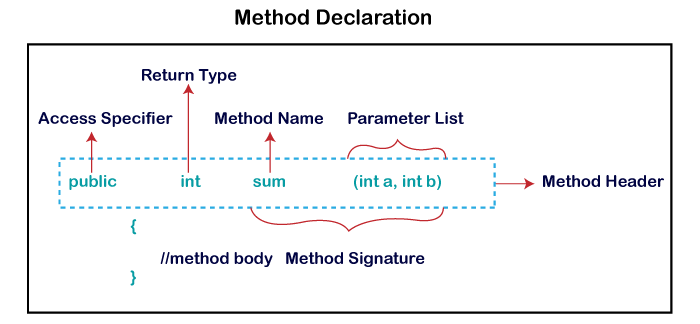
Look at this code
class Dog{

    public void dogbark(int bark) {  //parameter

        System.out.println(bark);
    }
}

public class Show {

    public static void main(String[] args) {

        Dog d= new Dog();
        d.dogbark(3);  //argument
    }
}
you can send more than one thing to a method
The arguments can pass in the same order you passed them. The first argument in the first parameter. the second argument is the second parameter and so on
Look at this code,
class Dog{

    public void dogbark(String name ,int nub  ) {  //parameter

        System.out.println(name);
        System.out.println(nub);
}
}
public class Show {
public static void main(String[] args) {
Dog d= new Dog();
d.dogbark("Timmy" , 3); //argument
}
}output
Timmy
3
You Can get things back from methods.
Methods can return values. Every method has a return type, but up until now, we’ve given all of ours a void return type, which implies they don’t return anything.
void go(){}However, we can declare a method that returns a specific type of value to the caller, For Example:
int go(){
return 50;
}
Use a primitive data type (such as int, char, etc.) instead of void and the return keyword inside the method if you want the method to return a value.
For Example:
public class A{
  static int go(int x, int y) {
    return x + y;
  }
public static void main(String[] args) {
System.out.println(go(3 , 5));
}
}output
8
Encapsulation
It is a way to achieve data hiding because other classes will not be able to access the data through the private data members.

For Example:
class Student{private int student_no;private String name,email;//public getter and setter methodspublic int getstudent_no() {return acc_no;}public void setstudent_no(int acc_no) {this.student_no = student_no;}public String getName() {return name;}public void setName(String name) {this.name = name;}public String getEmail() {return email;}public void setEmail(String email) {this.email = email;}}How do Objects in an Array behave?
Let’s try calling a method on Dogs Objects using an array.
- Declare and create a Dog array with 7 Dog references.
Dog []pets; pets = new Dog[7]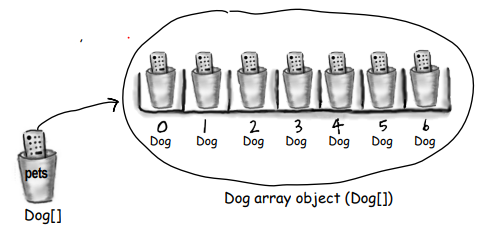
2. Create two Dog objects and assign them to the first two array elements
3. Call methods on the two Dog objects.
pets[0].setSize(30); int x = pets[0].getSize(); pets[1].setSize(8);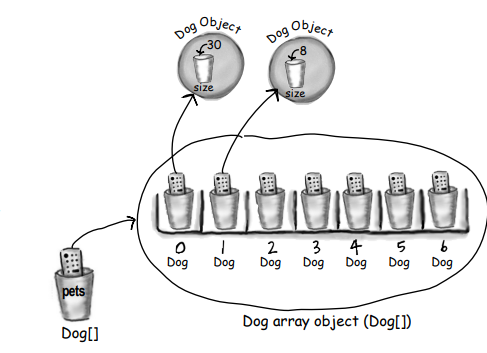
Difference between instance and local variables
Instance variable declared inside a class but not within a method
class Dog{private double height = 10;private String breed;void bark(){}
}Local variables are declared within a method.
class Dog{int a;int b = 12;public int add() {int total = a + b;return total;}}The important thing is Local variables MUST be initialized before use
class Foo {
 public void go() {
 int x =12;
 int z = 3;
}
}
if you do not initialize the local variable what happens.
Look at the code
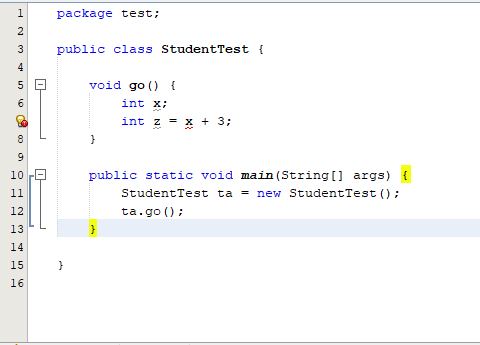
output

comparing variables
You want to know if two primitives are the same at times. It’s as simple as using the == operator. You want to know if two reference variables point to the same heap object. It also simply uses the == operator. However, there are times when you need to know if two items are equal. You’ll need the.equals() method for that. The concept of object equality varies depending on the type of object.
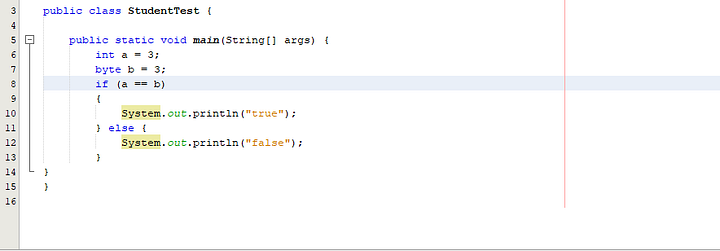
output
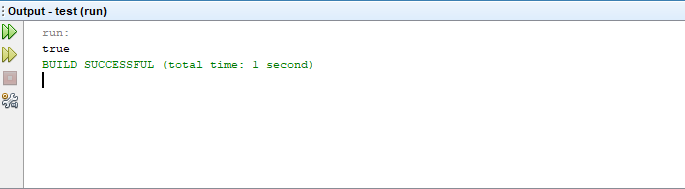
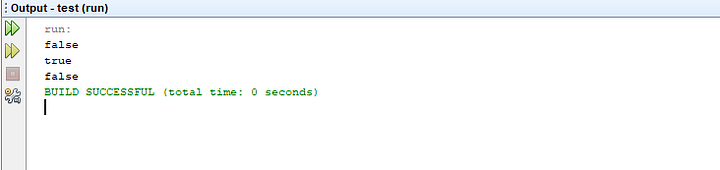
Keep in mind that the == operator is only concerned with the pattern of bits in the variable. Whether the variable is a reference or a primitive, the rules are the same. If two reference variables belong to the same object, the == operator returns true! We don’t know what the bit pattern is in that scenario (since it’s dependent on the JVM and hidden from us), but we do know that will be the same for two references to the single object.
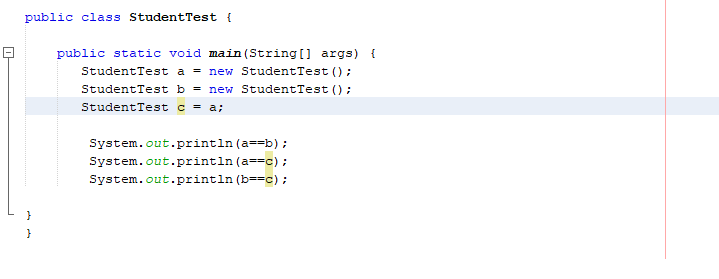
out put
Conclusion
I hope, in this article, you can get knowledge about How Object behave . I will cover Java in upcoming articles. Stay on with me.
Reference
Bates, B. and Sierra, K., 2005. Head First Java, 2nd Edition. [S.l.]: O’Reilly Media, Inc.
Comments
Post a Comment